


ClassDojo
4.882.74K Reviews
App Specs
- Version
- 8.82.0
- Updated On
- License
- Free
- Downloads
- 50,000,000+
- Developer
- ClassDojo
- Categories
- Education
- Platform
- Android, iOS
Screenshots
 Analysis by AppCompare
ClassDojo makes the most sense when a classroom wants one shared place for teacher-family communication and student encouragement. I like that its purpose is easy to understand: it is not trying to replace lessons or become a full school-management system. Instead, it gives teachers, students, and families a common channel for classroom updates and recognition. That focus can be genuinely useful, though it also means the experience depends on a teacher and families choosing to use it consistently.
A focused bridge between home and school
Created by ClassDojo, this free education app has been around since February 25, 2013. Its current version is 8.20.0, and it requires Android 8.0 or later. The app is rated for Everyone, but the fact that children may use it does not remove the need for adults to guide how it fits into school communication. It has a 4.8 average from around 1.3 million ratings, with over 10 million installs, a substantial footprint for a classroom-centered tool.
That popularity is useful context, not a guarantee that it will suit every school. I would think of ClassDojo less as a universal education app and more as a shared routine: teachers post or send information, families check in, and students can receive feedback. The free entry point makes it easy to consider, while in-app purchases ranging from $0.99 to $199.99 per item mean families should check what is optional before spending. The central value, in my view, is the communication loop rather than buying anything.
What Exactly is ClassDojo?
Alright, picture this: a classroom where teachers and parents are in sync, students are motivated, and everyone’s on the same page. That’s ClassDojo for you. It’s a communication platform that bridges the gap between teachers, parents, and students. It’s all about creating a positive classroom culture and encouraging students to thrive.
Features That Stand Out
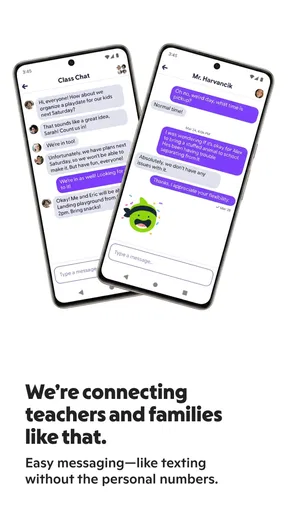
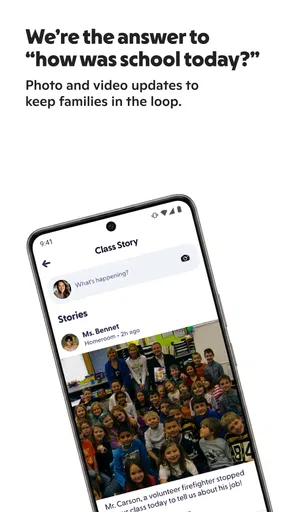
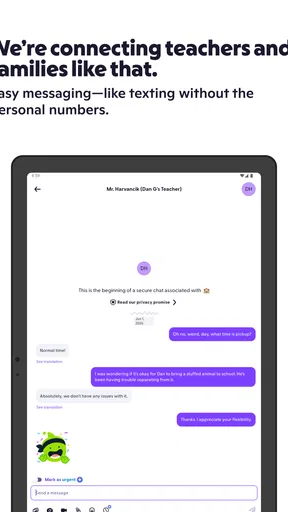
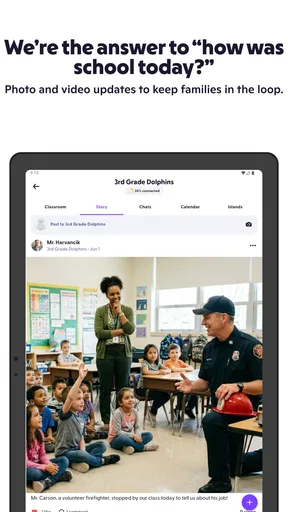
First off, there’s the communication aspect. Teachers can easily send updates and messages to parents about their child’s progress. No more waiting for parent-teacher conferences to find out how little Timmy is doing in math class. Parents can get real-time updates and even see photos or videos of classroom activities.
That flow is most helpful when a message is small and timely: a family can see a classroom moment or receive an update without waiting for a formal meeting. A practical habit is to treat posts as a window into the school day, not as a complete progress report. If a parent needs to understand a recurring difficulty, a direct conversation with the teacher is still more useful than trying to infer the whole story from occasional updates.
There is also a quiet trade-off in putting classroom communication in an app. It can reduce the friction of sharing ordinary news, but it may create an expectation that adults are always available to respond. I would set a simple boundary early: use messages for brief school-related coordination, and agree that urgent or sensitive matters need another route. That keeps the convenience without turning every notification into a demand for an immediate answer.
Worth Reading Before You Choose

Switching to Android Auto Means Rethinking Your Driving Routine

Google Calendar Makes a Crowded Week Easier to Manage

Baby Panda World Brings Quick Play to Modern Phones, but Its Game Library Feels Busy

ESPN’s Live Game View Makes Following Close Games Easier

QuizzLand Review: A Good Fit for Short Trivia Breaks, Not Every Player

Basketball Stars: Multiplayer Is Fast, but Can It Recover When Matches Go Wrong?
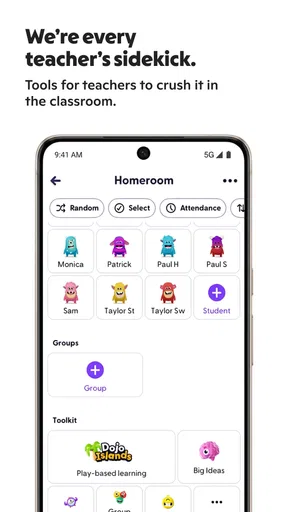
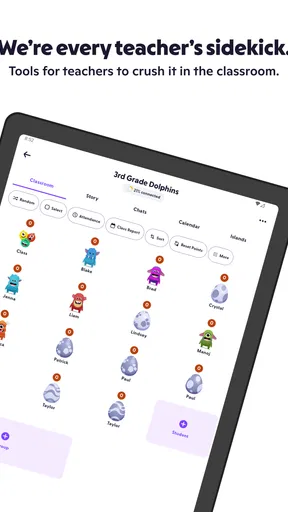
Then there’s the student feedback system. Teachers can award points to students for positive behavior and achievements. It’s like a digital pat on the back, and let’s be real, who doesn’t love a little recognition now and then? This system encourages students to stay engaged and strive for success.
The points work best when the teacher explains what they represent and uses them consistently. Otherwise, students can focus on collecting points rather than understanding the behavior or effort being recognized. I would also avoid treating a score as a full picture of a child’s progress: feedback is most constructive when it leads to a short conversation about what went well and what to try next. That distinction matters especially for children who respond differently to public recognition.
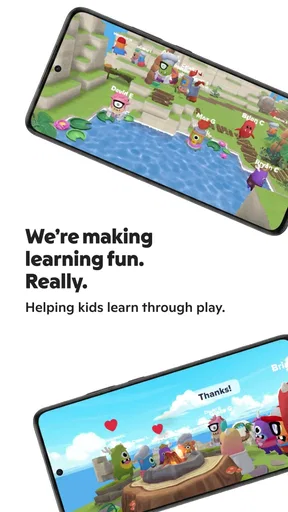
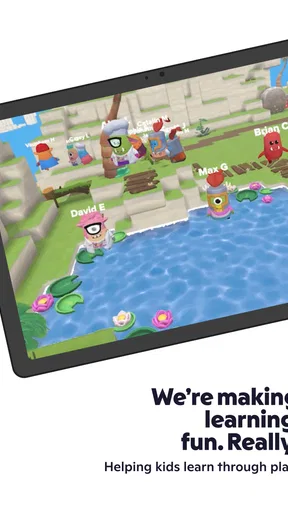
One of my favorite features has to be the customizable avatars. Students can create their own little monster avatar, which they love. It adds a fun, personal touch to their learning experience, and honestly, it’s a nice break from the usual boring ed-tech interfaces.
For a teacher, a useful approach is to introduce the avatar and feedback routine as a small classroom ritual rather than letting the app become the lesson itself. For example, a class can use a brief end-of-day check-in to recognize a helpful choice, then move on. That keeps the playful layer in proportion and makes it easier for children to connect recognition with the behavior being discussed, not just with the visual reward.
Getting Started with ClassDojo
Setting up ClassDojo is super straightforward. Teachers create a class and invite parents and students to join. Once everyone’s in, it’s smooth sailing. The interface is user-friendly, and even for those who aren’t exactly tech-savvy, it’s easy enough to navigate.
The setup is simple, but the class only becomes useful when the right people join and know what to expect. Teachers can make the first invitation clearer by explaining what families are likely to see, how often updates will arrive, and which kinds of questions belong in a message. That small bit of context can prevent a quiet feed from being mistaken for a problem, or a busy feed from feeling like another stream parents must monitor all day.
Families considering it can ask a practical question before signing up: is the child’s teacher already using it as a regular channel? If not, installing the app alone may not create a useful connection. It works best as a shared classroom choice, rather than as a personal planner that a parent can populate independently. For households with more than one child, it is also worth checking that invitations and class details are organized clearly so updates do not get mixed up.
One thing I appreciate is the privacy and security measures in place. They’ve got this covered with strict policies, ensuring that all data is kept safe. It’s comforting to know that they take privacy seriously, especially when dealing with kids’ information.
Because the app can involve children and classroom media, I would still encourage families to read the relevant privacy information and follow the school’s own guidance before sharing anything. A parent should be comfortable with how classroom photos and messages are handled, and teachers should be thoughtful about what they post. That is not a reason to avoid the app; it is a sensible part of using any digital channel involving students.
How Does it Impact the Classroom?
The real magic happens in the classroom. Teachers have reported a noticeable improvement in student behavior and engagement. The point system motivates students to participate and behave positively. Plus, the ability to share classroom moments with parents keeps everyone in the loop, fostering a community feeling.
I would be careful about expecting an app by itself to change classroom behavior. The strongest results are more likely when teachers connect feedback to clear expectations and use it as one part of their classroom approach. A point can acknowledge an effort, but it cannot replace patient instruction, individual support, or a conversation about why a classroom rule matters. The app is a tool for making some of that communication visible, not a substitute for the teacher’s judgement.
A realistic everyday use might look like this: a teacher shares a short classroom update, then a parent checks it after work and asks their child about a specific activity at dinner. If the child mentions a proud moment, the family can reinforce it at home; if the update raises a concern, the parent can ask the teacher for context rather than guessing. This is where the app’s small, ordinary touchpoints can be more valuable than waiting for a major school meeting.
Parents love it too. They feel more connected to their child’s education and can support learning at home. It opens up a dialogue between parents and teachers, making it easier to address any issues or celebrate successes.
Compared with relying on occasional paper notes or waiting for a scheduled meeting, ClassDojo can make routine classroom news easier to share. Compared with a general messaging app, its classroom focus gives the exchange a clearer context. But a school that already has a well-used parent portal or communication system may not benefit from adding another channel; families can end up checking several places for the same kind of information. I would follow the teacher’s established method rather than press for a new app if the current system is working.
Who Will Get the Most from It?
I see the best fit as a teacher who wants to make everyday communication more visible, a family that appreciates brief school updates, and a student who responds well to positive recognition and a playful avatar. It can be especially handy when a parent cannot be present during the school day but still wants conversation starters about what happened in class. Families who prefer fewer notifications, or who do not want behavior represented through points, may find the format less comfortable.
It is also not the right answer for every communication need. A detailed discussion about a child’s learning, a sensitive family matter, or a concern that needs a careful back-and-forth is better handled directly with the teacher. Likewise, students who feel pressured by visible rewards may benefit more from quieter, individual encouragement. I would treat ClassDojo as an optional support for classroom connection, not as a measure of a child’s worth or a replacement for personal contact.
Final Thoughts
Overall, ClassDojo is a fantastic tool for creating a collaborative and positive learning environment. It’s easy to use, fun for students, and keeps everyone connected. Whether you’re a teacher looking to boost classroom engagement or a parent wanting to stay informed, this app is worth checking out. So, what are you waiting for? Give it a try and see the difference it makes in your educational journey!
Pros
- User-friendly interface for teachers and students.
- Encourages positive behavior with rewards.
- Real-time parent-teacher communication.
- Customizable class settings and rewards.
- Available on multiple platforms.
Cons
- Limited features in free version.
- Requires constant internet connection.
- Privacy concerns with student data.
- Notifications can be overwhelming.
- Some features require setup time.
FAQs for ClassDojo
What is ClassDojo, and how does it work?
ClassDojo is an educational communication app that connects teachers, students, and parents. It allows teachers to create a positive classroom culture by providing tools for feedback, sharing photos and videos of classroom activities, and facilitating communication with parents. Teachers can award points for positive behavior, and students can share their progress through digital portfolios.
Is ClassDojo free to use?
Yes, ClassDojo is free for teachers, parents, and students. The app offers a variety of core features at no cost, including communication tools and classroom management resources. However, there is a premium version called ClassDojo Plus, which offers additional features for a subscription fee, such as personalized feedback and advanced reports.
How secure is the information shared on ClassDojo?
ClassDojo takes privacy and security seriously, implementing measures to protect user data. The app complies with major privacy regulations such as COPPA and FERPA. It uses encryption to safeguard information, and users have control over what information they share. ClassDojo does not sell or rent personal information to third parties.
Can ClassDojo be used for remote learning?
Yes, ClassDojo is well-suited for remote learning environments. Teachers can post assignments, share multimedia content, and communicate with students and parents in real time. Students can submit their work digitally and receive feedback, making it a versatile tool for both in-person and remote education settings.
What devices are compatible with ClassDojo?
ClassDojo is compatible with a wide range of devices, including smartphones, tablets, and computers. It is available as an app for both Android and iOS devices, and it can also be accessed via web browsers on desktops and laptops. This flexibility ensures that users can stay connected from virtually any device.


